
TL;DR (太长不看版):
上周,Obsidian CEO @kepano 询问大家如何配合使用 Claude Code。我抓取并分析了约 200 条有效回复,核心结论如下:
-
重新定义 Obsidian:它不再仅仅是笔记本,而是 AI 的 "Persistent Context Layer" (持久化上下文层)。把你的决策、架构图、Do's & Don'ts 存在这里,Claude 才能从“通用模型”变成“你的专属员工”。
-
最佳实践架构:
-
Context:在 Vault 根目录放
CLAUDE.md,定义 AI 的角色和边界。 -
Trigger:使用
/today或 cronjobs 每天自动触发。 -
Action:通过 MCP 连接 GitHub、日历或 Zotero。
-
-
三个高价值场景:
-
LifeOS:全天候个人助理,自动整理 Inbox 和 CRM (@svenkataram)。
-
批量重构:不仅是整理,而是清洗成千上万条旧笔记 (@RonnyKhalil)。
-
研究自动化:从 Research Claim 到 Paper 的双向拆解与生成 (@frihyde)。
-
留言告诉我,哪一些场景是你感兴趣的?
👇 阅读下方的完整 5000 字报告,获取所有工具清单和 Prompt 思路。
:@kepano 帖子「if you're using Obsidian with Claude Code, tell me about your workflow」 采集时间:2026年1月5日 | 原帖时间:2026年1月2日 帖子数据:347 回复 | 358 转发 | 4.1K 点赞 | 7.1K 收藏 | 738K 浏览 有效回复采集
核心收获: Obsidian × Claude Code 的最佳实践是 「Context Layer + Skills/Commands + Automated Pipelines」 —— 把 Obsidian 当作 persistent context layer(存储所有决策、约束、工作流),用 skills/commands 封装可复用任务,通过 webhooks/cronjobs/MCP 实现端到端自动化。最高价值场景是 批量清理/迁移旧笔记、研究到产出的自动化链条、以及 个人 OS/Life Coach 系统。
回复清单(约 200 条有效回复,按主题分组)
高互动核心回复(>100 likes/views)
| 作者 | 时间 | 互动 | 一行摘要 |
|---|---|---|---|
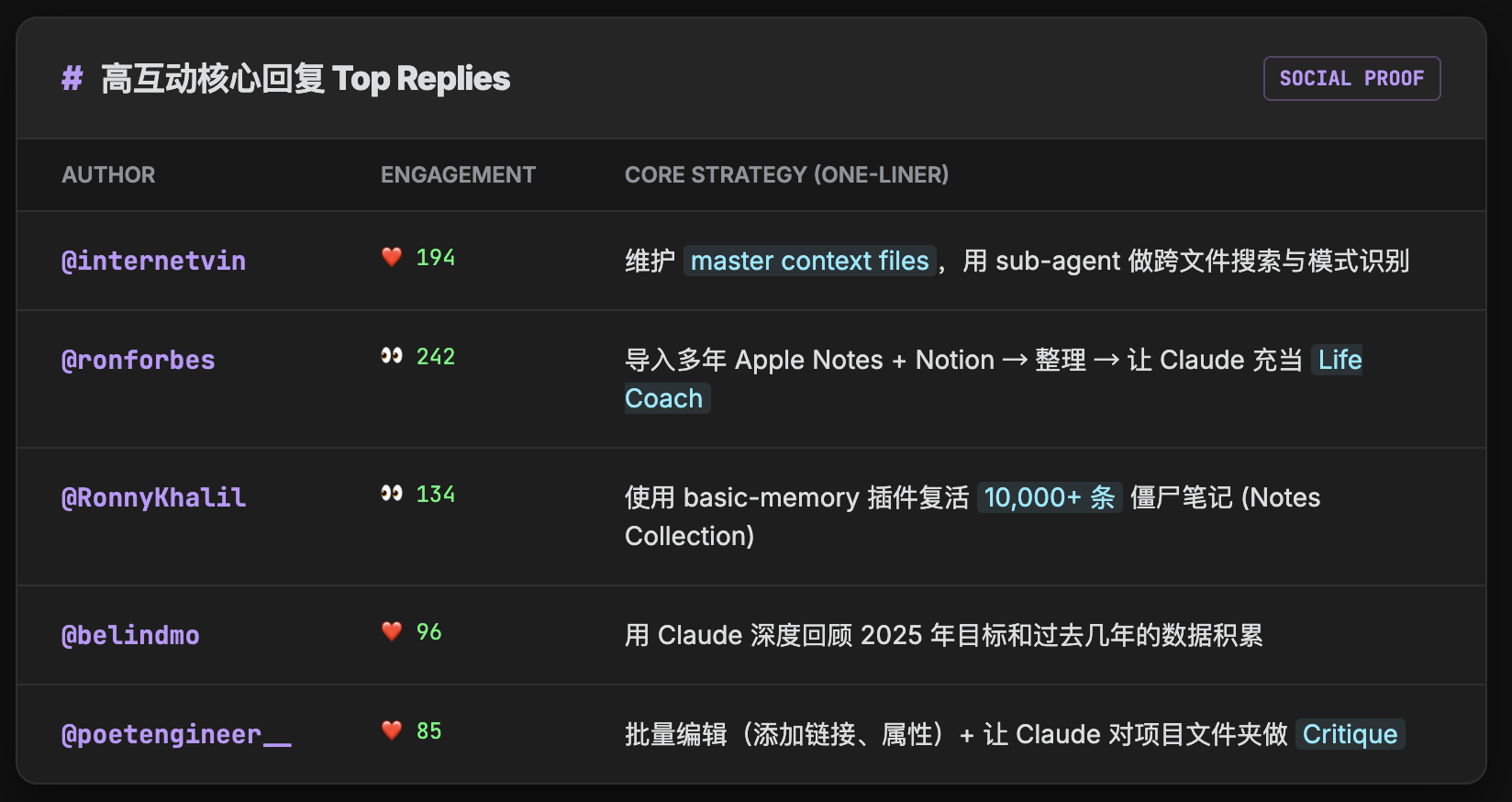
| @internetvin | Jan 2 | 194 likes | 维护 master context files,用 sub-agent 做跨文件搜索 |
| @poetengineer__ | Jan 3 | 85 likes | 批量编辑(添加链接、属性)+ 项目文件夹让 Claude 做 critique |
| @belindmo | Jan 2 | 96 likes | 用 Claude 回顾 2025 年目标和过去几年数据 |
| @davidhoang | Jan 2 | 45 likes | 识别新 backlinks、知识库综合、批量重组织 |
| @jmduke | Jan 2 | 54 likes | 批量 metadata 编辑、插入遗漏的 backlinks |
| @nexo_v1 | Jan 2 | 47 likes | 从 Notion 迁移,因为 vault 是本地文本文件易于操作 |
| @DontFearAI | Jan 3 | 51 likes | 用 Web Clipper 转 markdown 后上传给 Claude |
| @ronforbes | Jan 3 | 242 views | 导入多年 Apple Notes + Notion → 整理 → Claude 当 life coach |
| @RonnyKhalil | Jan 2 | 134 views | 用 basic-memory 复活 10,000+ notes collection |
工作流/系统设计类
| 作者 | 时间 | 一行摘要 |
|---|---|---|
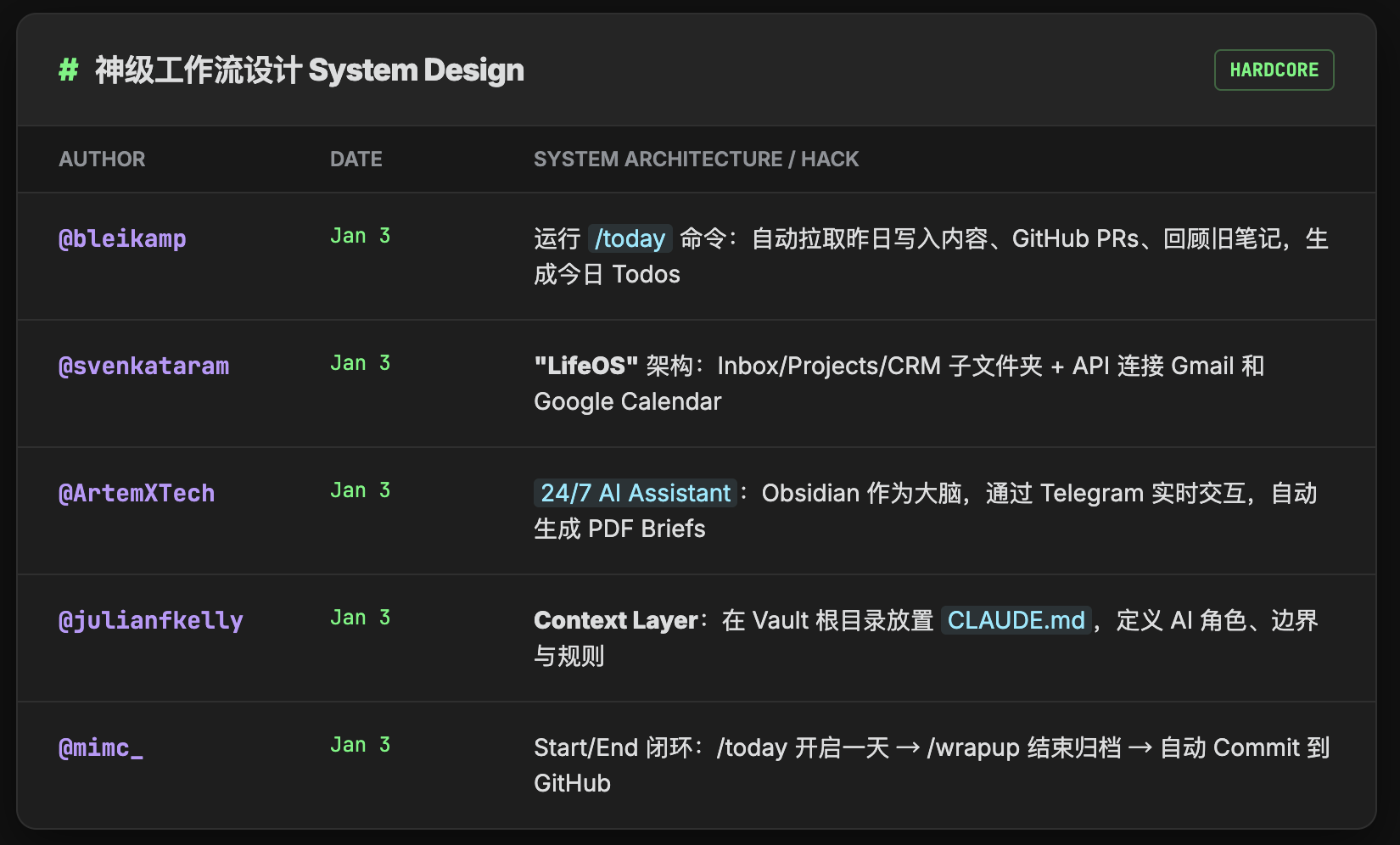
| @bleikamp | Jan 3 | /today 命令:拉取昨天内容、GitHub PR、old notes、生成 todos |
| @julianfkelly | Jan 3 | 在 vault 根目录放 CLAUDE.md 定义角色和规则 |
| @InferenceActive | Jan 3 | 用 README.md 和 AGENTS.md 指导 Claude |
| @adamdavidlong | Jan 2 | 每个区域/项目单独 Claude 实例 |
| @markfrancisio | Jan 3 | 层级时间结构(/year → weekly → daily) |
| @imaurer | Jan 2 | Inbox/Outbox design iteration(Obsidian = IDE) |
| @niksite | Jan 3 | 每天早上检查 GitHub issues/PR/Sentry/咖啡馆菜单 |
| @jonathanprozzi | Jan 3 | hooks/commands 系统让 Claude 全天候运行 |
| @ArtemXTech | Jan 3 | 24/7 AI Assistant Architecture(有架构图) |
| @svenkataram | Jan 3 | "LifeOS" 子文件夹:阅读、inbox、项目、CRM + 邮件/日历连接 |
| @mimc_ | Jan 3 | personal OS + Whispr flow,/today + /wrapup,auto-commit to GitHub |
| @gandurian | Jan 4 | 完整工作流:automated inbox + weekly vault reviews + auto-citations + reflection loops |
| @FabianAguilar | Jan 2 | start-session workflow:review docs + mobile scratch pad → auto-clear |
Obsidian 组织方式类
| 作者 | 时间 | 一行摘要 |
|---|---|---|
| @conner_xyz | Jan 3 | quartz + 简单文件夹结构(blog/operations/people/guides/reference) |
| @sughanthans1 | Jan 2 | knowledge.md + gameplan.md |
| @rcanand | Jan 2 | 笔记分类为 learn/churn/building 三类 |
| @BradenBuchanan_ | Jan 2 | Zettelkasten-style + VS Code post-writing assistant |
| @korenmiklos | Jan 3 | Claims Vault 记录研究 claims + Claude skills 拆解 papers |
| @TheGyanStack | Jan 3 | "persistent context layer":architecture decisions/runbooks/constraints |
| @LatentFreedom | Jan 3 | PARA organization for second brain |
| @eminmeydanoglu | Jan 3 | 用 stephango.com/vault 的哲学整理 messy vault |
Claude Code 用法类
| 作者 | 时间 | 一行摘要 |
|---|---|---|
| @chaseadams | Jan 3 | 分享 commands + skills 列表(ai-log、create-event、expand-writing 等) |
| @shreyshahi | Jan 3 | 不组织笔记,只用 Claude 当搜索引擎 |
| @Cato_Pine | Jan 3 | progressive disclosure memory system —— agents 检查 memory 并存储结果 |
| @askpascalandy | Jan 3 | killer use case:"Based on my notes about X, what would I have said about Y?" |
| @Tsshin0829 | Jan 2 | sub-agents + Claude Skill resolve aliases(修复 [[alias]]) |
| @frihyde | Jan 3 | academic sparring partner "Think notebookLM but personalized" + Zotero MCP |
| @chrshys | Jan 3 | claude agent sdk 构建助手,通过 Telegram/voice/web/terminal 访问 |
| @juancaviglia | Jan 3 | 允许 Claude 更新所有 vault 文件 + custom commands |
自动化/脚本类
| 作者 | 时间 | 一行摘要 |
|---|---|---|
| @eSaadster | Jan 3 | webhooks 同步 repo → vault + Obsidian kanban 触发 agents |
| @anthonyronning | Jan 3 | Claude 写 bash script 备份目录后再编辑 |
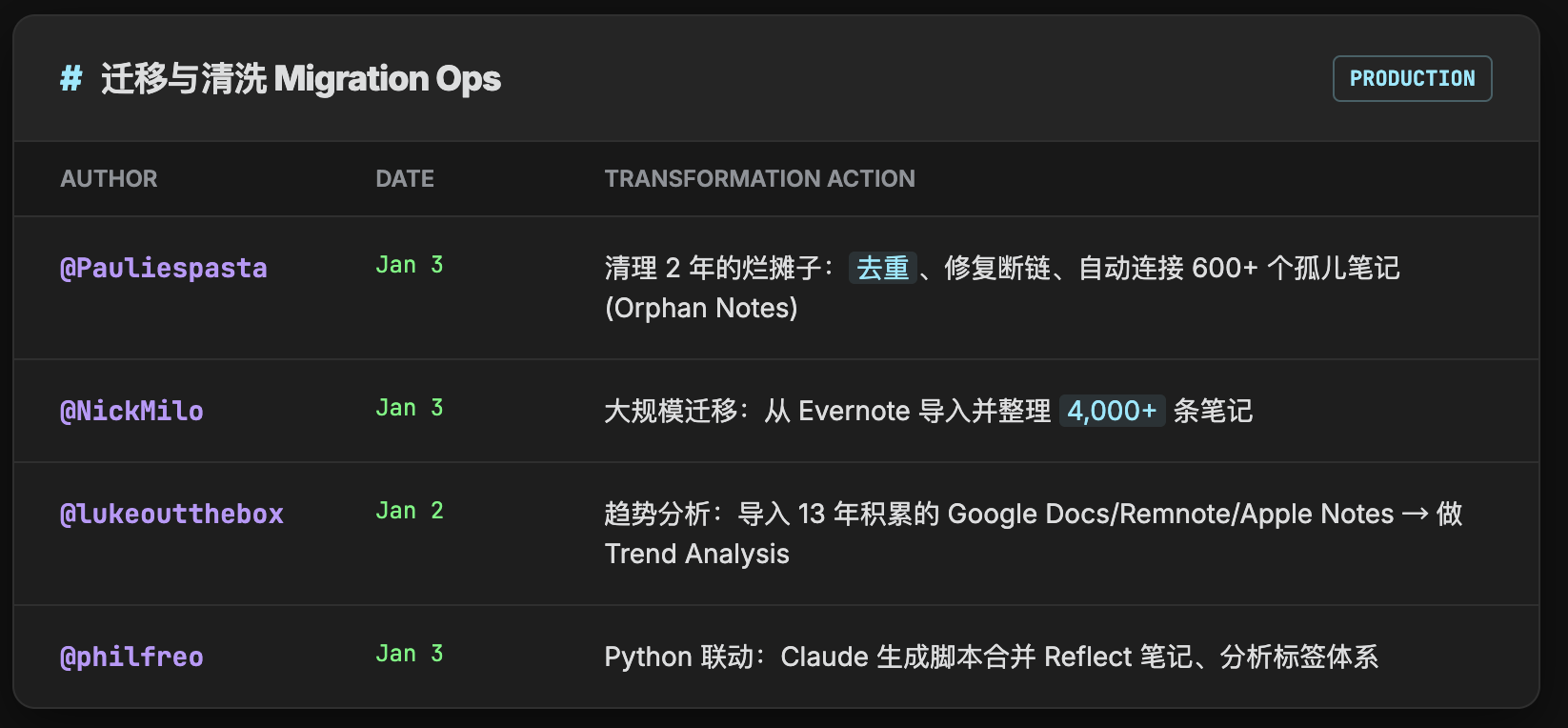
| @philfreo | Jan 3 | 合并 Reflect 笔记、分析标签、用 Python 做迁移 |
| @reubenloojl | Jan 3 | "AI COO":ecommerce business + cronjobs 自动运行 workflows |
| @tonynolan1968 | Jan 2 | termux 手机语音输入 → inbox → agents 处理 |
| @echophons | Jan 3 | research agent 找 10-20 sources → summarizes into obsidian note |
| @neuralbanksy | Jan 3 | dump daily notes → weekly reviews + tags + action items + project tracking |
笔记→产出类
| 作者 | 时间 | 一行摘要 |
|---|---|---|
| @mattarderne | Jan 3 | "Cursor for writing" + git diff review |
| @wesgay | Jan 2 | Evernote → Obsidian + transcripts → templated notes + 写书 |
| @brainscott | Jan 3 | weekly/monthly reflections from Daily notes |
| @gootecks | Jan 3 | 直播文档 + mermaid 图表 |
| @vic_iwnl | Jan 2 | 让 Claude 总结项目贡献用于 performance review |
| @chpapa | Jan 4 | 1. daily digest 2. plan day 3. LinkedIn posts from changed notes |
| @rachtsingh | Jan 2 | Claude Code 写 design docs → sync 到 vault → PDF |
检索/索引类
| 作者 | 时间 | 一行摘要 |
|---|---|---|
| @BeyondPremiere | Jan 3 | chroma db + Claude 找 patterns |
| @DanBatten | Jan 3 | Obsidian + reference database with API access |
| @sowmay_jain | Jan 3 | wikilinks 作为知识图谱 |
| @braindedxx | Jan 3 | 索引整个 users folder + 2 GitHub accounts + NotebookLM MCP |
| @_grojo | Jan 3 | MCP on home server → natural language query system |
| @micka_dore | Jan 2 | Codex cli + homemade Obsidian MCP(Bases API + smart connections) |
| @jeongsk7 | Jan 2 | research org + Claude Code + Exa MCP:define scope → structured reports |
插件/集成类
| 作者 | 时间 | 一行摘要 |
|---|---|---|
| @roasbeef | Jan 3 | 开源 obsidian-claude-code 插件(嵌入 SDK) |
| @heyitsnoah | Jan 3 | claudesidian 项目(内容管理系统) |
| @Yishen_Tu | Jan 3 | claudian 插件(275 stars)—— sidebar chat interface |
| @rainbow_0219 | Jan 3 | Agent Client Plugin:via Agent Client Protocol 使用多种 agents |
| @ChristianWiess1 | Jan 3 | claude-lecture-processor:lecture slides → MOC |
| @pspenano | Jan 3 | obsidian-claude-code-plugin(从 Obsidian 启动 CC) |
| @drrobcincotta | Jan 3 | MCP 连接 Zotero + PubMed |
| @aditya_advani | Jan 3 | go cli 访问 Google Calendar/Gmail |
质量控制类
| 作者 | 时间 | 一行摘要 |
|---|---|---|
| @hellesgrind | Jan 3 | 第二视角 + weekly recap + daily metrics analytics |
| @Plinythebelter | Jan 2 | Obsidian Canvas flowchart 作为 Claude 指令 |
| @markacianfrani | Jan 2 | 只让 Claude connecting ideas,内容必须标 <ai-suggestion> |
| @K41R0N | Jan 3 | 分层上下文(note → sub-folder → folder level) |
| @mccue | Jan 3 | MCP server 控制 token 消耗 |
隐私/安全类
| 作者 | 时间 | 一行摘要 |
|---|---|---|
| @oskarth | Jan 3 | 不给整个 vault,只给特定 DB 文件夹 |
| @brendanhanson | Jan 2 | 两个 vault(business + personal) |
| @nickbarton | Jan 2 | 对隐私有顾虑(给 closed source corporate model 访问私人数据) |
| @suyebom | Jan 3 | 痛点:Obsidian Sync + .Claude subdirectory 不兼容 |
| @AntoineLeBaux | Jan 4 | 痛点:Obsidian Sync 无法与 Claude Code Web 一起使用 |
反例/踩坑类
| 作者 | 时间 | 一行摘要 |
|---|---|---|
| @dming | Jan 2 | 信噪比问题:daily template 太复杂难以区分信号 |
| @omarsaleemmd | Jan 3 | Claude append 权限问题 |
| @philzona | Jan 3 | 手动整理才有价值(反观点) |
| @codewithimanshu | Jan 3 | Obsidian API access 只有 75% 成功率 |
| @0rderFl0w | Jan 3 | Dataview 无法索引 symlinked files |
| @Mcoudert | Jan 2 | token 消耗太高 |
| @sokindling | Jan 3 | 移动端无法给 Claude app 访问 Obsidian |
| @yggdrasil__ai | Jan 2 | CC 太贵 |
| @DerekColling1 | Jan 2 | "It's more work than it's worth" |
迁移/清理类
| 作者 | 时间 | 一行摘要 |
|---|---|---|
| @NickMilo | Jan 3 | 整理 4000 个 Evernote 笔记 |
| @lukeoutthebox | Jan 2 | 导入 13 年 Google Docs/Remnote/Apple Notes/Roam → trend analysis |
| @Pauliespasta | Jan 3 | 清理 2+ 年 mess:删重复/修 links/连接 orphan notes(613 files) |
| @Lucasbfranco | Jan 3 | 脚本把 Google Docs 转为 MD 文件 |
| @parquetgood | Jan 3 | 导入整个 archive + 给 clippings 加 wiki-links |
分类总结(核心方法论提炼)
A. 工作流/系统设计
关键模式:
-
Master Context Files 模式:在 vault 根目录维护 CLAUDE.md / AGENTS.md,定义 Claude 的角色、规则、可用工具
-
Daily → Weekly → Monthly 聚合链:daily notes 自动聚合为 weekly summary,再聚合为 monthly review
-
Inbox/Outbox 设计迭代:用 inbox 收集原始输入,Claude 处理后输出到 outbox
-
项目隔离实例:每个项目/领域单独启动一个 Claude 实例,避免上下文污染
-
/today 启动命令:每天启动时自动拉取昨天内容、GitHub PR、old notes,生成 todos
-
24/7 AI Assistant Architecture:Obsidian → Your Computer (Claude Code + Context) → Telegram/SMS → Automation
-
LifeOS 子文件夹模式:阅读/inbox/项目/CRM 独立子文件夹 + 邮件/日历 API 连接
-
start-session + wrapup 工作流:/today 开始(拉取上下文)→ 工作中 → /wrapup 结束(存档总结)
-
Exa MCP 研究自动化:define research scope → Claude pulls data via Exa → synthesizes into structured reports
高价值实例:
-
@internetvin(Jan 2):"maintaining specific master context files in Obsidian for major projects"
-
@bleikamp(Jan 3):"/today command… pulls in content saved/read/written yesterday, GitHub PRs needing review"
-
@ArtemXTech(Jan 3):"24/7 AI Assistant Architecture… Clawd sends me daily pdf briefs"
-
@svenkataram(Jan 3):"running 'LifeOS' subfolder—reading, inbox, projects, CRM… connected to email and calendar"
-
@mimc_(Jan 3):"/today… /wrapup to review progress… Everything is auto-committed to GitHub"
-
@jeongsk7(Jan 2):"Obsidian vault for research org… Claude Code with Exa MCP… synthesizes into structured reports"
可执行动作:
-
创建
CLAUDE.md放在 vault 根目录,定义 Claude 的角色和边界 -
设置
/today启动命令,让 Claude 每天早上整理待办 -
按项目建立独立文件夹,每个文件夹有自己的 context file
-
构建 24/7 个人助手:Obsidian 存储所有 context → Claude Code 处理 → Telegram/邮件推送 daily brief
B. Obsidian 组织方式
关键模式:
-
时间层级结构:/year → /week → /daily 的嵌套组织
-
一级扁平文件夹:blog/ operations/ people/ guides/ reference/ 的简单分类
-
knowledge.md + gameplan.md:每个项目维护知识文件和计划文件
-
learn/churn/building 三分法:按笔记的生命周期阶段分类
-
Zettelkasten atomic notes:原子化笔记 + 链接网络
-
Claims Vault:研究 claims 之间用 hyperlinks 链接 + minimal metadata
-
persistent context layer:Project notes、architecture decisions、runbooks、constraints 全部在 Obsidian
-
arxiv/library of congress classification:学术笔记按学科分类
高价值实例:
-
@conner_xyz(Jan 3):"1-level of folders: blog/, operations/, people/, guides/, reference/"
-
@sughanthans1(Jan 2):"ask Claude to create a knowledge.md as we go along and finally gameplan.md"
-
@korenmiklos(Jan 3):"Claims Vault to note research claims… linked via hyperlinks… Claude has skills of breaking up research papers into individual claims"
-
@TheGyanStack(Jan 3):"I use Obsidian as a persistent context layer. Project notes, architecture decisions, runbooks, and constraints live there"
可执行动作:
-
建立简单的一级文件夹结构,避免过度嵌套
-
每个项目创建 knowledge.md(积累)和 gameplan.md(执行)
-
为学术/研究内容建立 Claims Vault,每个 claim 一个 note
-
把 Obsidian 定位为"persistent context layer"而非简单笔记本
C. Claude Code 用法
关键模式:
-
Slash Commands 自定义:/today /journal /analyze-mood 等可复用命令
-
Skills 文件夹:vault 中 skills/ 目录存放特定任务的 prompt 模板
-
批量处理模式:一次性处理数百个文件的 metadata、backlinks、tags
-
Claude 当搜索引擎:不手动整理,让 Claude 实时检索和综合
-
生成 first draft:Claude 输出初稿,人类迭代修改
-
progressive disclosure memory system:agents 在执行前检查 memory 并在每个 action 后存储结果
-
"Based on my notes about X, what would I have said about Y?":让 Claude 从你的视角思考
-
sub-agents for different tasks:不同任务用不同专门的 sub-agent
-
Claude Skill resolve aliases:修复
[[alias]]为[[actual name|alias]] -
academic sparring partner:"Think notebookLM but personalized"
高价值实例:
-
@chaseadams(Jan 3):"commands + skills list: ai-log, create-event, expand-writing"
-
@jmduke(Jan 2):"mass metadata editing, also 'insert backlinks that I missed'"
-
@Cato_Pine(Jan 3):"progressive disclosure memory system for Claude that actively stores, deprecates, and updates the work you are doing"
-
@askpascalandy(Jan 3):"killer use case: 'Based on my notes about X, what would I have said about Y?'—makes Claude reason from my perspective"
-
@Tsshin0829(Jan 2):"Claude Skill that resolves aliases across the notes… resolve wikilinks to '[[actual name|alias]]'"
-
@frihyde(Jan 3):"academic sparring partner… Think notebookLM but personalized. Claude Code has access to my zotero via mcp server"
可执行动作:
-
创建
.claude/commands/目录存放常用命令 -
用
/analyze-mood等命令做情绪日志分析 -
批量处理时先让 Claude 写脚本,人工 review 后执行
-
实现 memory system:每次 Claude 执行后存储 context 到专门文件
-
问 Claude "基于我的笔记,我会怎么看待这个问题?"
D. 自动化/脚本
关键模式:
-
Webhooks 触发:repo 变更自动更新 vault,kanban 卡片触发 dev agents
-
hooks/commands 系统:Claude 全天候监听并响应
-
备份后编辑:Claude 先写 bash 脚本备份目录,再执行编辑
-
Granola → Obsidian 自动同步:会议转录自动导入
-
Python/CLI 批处理:Claude 生成脚本批量处理文件
-
cronjobs 运行 workflows:定时自动执行 Claude workflows + skill logging
-
n8n workflow for YT transcripts:用 n8n 自动获取 YouTube 字幕
-
auto-commit to GitHub:所有变更自动 commit
-
termux 手机语音输入:手机端语音 → inbox → agents 处理
-
research agent with WebSearch/WebFetch:自动找 10-20 sources → summarizes
高价值实例:
-
@eSaadster(Jan 3):"webhooks to update vault when changes in repo… kick off dev agents when new cards posted in obsidian kanban"
-
@anthonyronning(Jan 3):"Claude write bash script to backup directory before editing"
-
@reubenloojl(Jan 3):"running my ecommerce business on it—building out skills for each part of the workflow, getting claude to run each workflow with cronjobs"
-
@tonynolan1968(Jan 2):"use termux on my mobile have a widget for speaking to obs. Saves it to an inbox then i have skills and agents that sort, process and organsie"
-
@echophons(Jan 3):"research agent that finds 10-20 authoritative sources with the WebSearch / WebFetch tools & summarizes into a new obsidian note"
可执行动作:
-
设置 Git webhooks 自动同步代码变更到 vault
-
让 Claude 在任何批量操作前先备份
-
用 Granola 等工具自动导入会议记录
-
设置 cronjobs 定期运行 Claude workflows
-
手机端用 termux 语音输入到 inbox
E. 笔记→产出
关键模式:
-
"Cursor for writing":像用 Cursor 写代码一样用 Claude 写文章
-
transcripts → templated notes:音频/视频转录 → 结构化笔记
-
weekly/monthly reflections:从 daily notes 自动生成周/月复盘
-
年度回顾:让 Claude 分析全年笔记生成洞察
-
content outlines → drafts:大纲 → 初稿 → 成品
-
performance review 项目贡献总结:让 Claude 总结全年项目贡献
-
LinkedIn posts from changed notes:从最近 14 天修改的笔记生成 LinkedIn 帖子
-
Claims → Papers 双向:拆解 papers 为 claims / 从 claims 生成 papers
-
design docs → PDF:Obsidian-specific prompt + skill 写 design docs → pandoc 导出
高价值实例:
-
@mattarderne(Jan 3):"Using it as a front end for 'Cursor for writing'"
-
@wesgay(Jan 2):"convert transcripts into templated notes, generate content outlines, help me draft a book"
-
@brainscott(Jan 3):"building weekly & monthly reflections from my Daily notes"
-
@vic_iwnl(Jan 2):"Claude to summarize these. very good for summarizing project contributions at performance review time"
-
@chpapa(Jan 4):"Generate LinkedIn posts from notes changed last 14 days"
-
@korenmiklos(Jan 3):"Claude has some skills of breaking up research papers into individual claims"
可执行动作:
-
用 Claude 把会议录音转为结构化笔记
-
每周末运行 /weekly-review 命令生成周报
-
年底让 Claude 分析全年笔记找趋势
-
设置命令从最近修改的笔记生成社交媒体内容
F. 检索/索引
关键模式:
-
Cross-file patterns sub-agent:用 sub-agent 跨文件搜索关键词
-
Chroma DB + Claude:向量数据库存储笔记,Claude 找 patterns
-
Reference database with API:独立知识库 + API 供 Claude 检索
-
Backlinks analysis:分析 wikilinks 作为知识图谱
-
Claude 替代手动搜索:直接问 Claude 而非手动翻笔记
-
NotebookLM MCP for deep research:用 NotebookLM MCP 做深度研究
-
natural language query system on home server:本地 MCP 服务器做自然语言查询
-
smart connections embeddings:用 embeddings 做语义连接
高价值实例:
-
@internetvin(Jan 2):"sub-agent called 'cross-file-patterns' to search for a term in Obsidian"
-
@BeyondPremiere(Jan 3):"use chroma db to save all my notes then asked Claude to find patterns"
-
@braindedxx(Jan 3):"Indexed my entire users/'user' folder+ 2 GitHub accounts. Use the vault for better grounding & NotebookLM MCP for deep research"
-
@_grojo(Jan 3):"I have an Mcp running locally over obsidian on a home server… use it as a natural language query system for my whole life"
-
@micka_dore(Jan 2):"Codex cli with a homemade Obsidian MCP… which has access to… smart connections embeddings"
可执行动作:
-
创建 cross-file search 的 Claude command
-
考虑用 Chroma DB 做向量索引
-
建立 reference/ 文件夹作为知识检索库
-
配置 NotebookLM MCP 做深度研究
G. 插件/集成
关键模式:
-
obsidian-claude-code:@roasbeef 的嵌入式 SDK 插件
-
claudesidian:@heyitsnoah 的内容管理系统
-
claudian(275 stars):sidebar chat interface 嵌入 Obsidian
-
Agent Client Plugin:via Agent Client Protocol 使用多种 agents(Claude Code, Codex, Gemini CLI)
-
MCP 连接外部工具:Zotero、PubMed、Figma、GitHub、Google Calendar
-
obsidian-terminal:从 Obsidian 直接运行终端命令
-
Web Clipper → Claude:网页转 markdown 后送给 Claude
-
claude-lecture-processor:lecture slides → structured knowledge + MOC
高价值实例:
-
@roasbeef(Jan 3):"obsidian-claude-code plugin… embed Claude Code directly into Obsidian using the agent SDK"
-
@Yishen_Tu(Jan 3):"claudian—An Obsidian plugin that embeds Claude Code as a sidebar chat interface"(275 stars)
-
@rainbow_0219(Jan 3):"Agent Client Plugin… Bring AI coding agents (Claude Code, Codex, Gemini CLI, etc.) directly into your vault"
-
@drrobcincotta(Jan 3):"MCP to connect Claude Code to Zotero and PubMed"
-
@ChristianWiess1(Jan 3):"claude-lecture-processor: Transform lecture transcripts into structured knowledge… PDF slides → summaries → atomic notes → MOCs"
可执行动作:
-
安装 claudian 插件在 sidebar 使用 Claude
-
尝试 Agent Client Plugin 使用多种 AI agents
-
配置 MCP 连接常用的外部工具
-
用 claude-lecture-processor 处理课程内容
H. 质量控制
关键模式:
-
git diff review:用 git 追踪变更,Claude + Obsidian 做 review
-
每周 1-2 次人工审核:Claude 处理后人工抽查
-
备份 → 执行 → 验证:三步流程确保安全
-
第二视角复核:让 Claude 扮演批评者角色
-
Canvas flowchart 作为指令:可视化工作流确保步骤不遗漏
-
<ai-suggestion>标签:Claude 写的内容必须标记,之后人工决定保留或删除 -
resolve aliases skill:自动修复错误的 wikilink aliases
-
文件夹权限分离:knowledge domains vs personal writing/projects/life documents
高价值实例:
-
@mattarderne(Jan 3):"CC as the driver and obsidian for review with git diff"
-
@hellesgrind(Jan 3):"giving second perspective on my thoughts"
-
@Plinythebelter(Jan 2):"create a flowchart with obsidian's canvas tool and then pass it to Claude as instructions"
-
@markacianfrani(Jan 2):"I don't let Claude write. If it does, it has to tag it as ai generated. It can only communicate via < ai-suggestion > elements that I later rip out"
可执行动作:
-
对 Claude 的修改用 git diff 做 code review
-
设置每周固定时间审核 Claude 的输出
-
用 Canvas 画工作流,让 Claude 按步骤执行
-
要求 Claude 用
<ai-suggestion>标记生成的内容
I. 隐私/安全
关键模式:
-
单文件夹权限:不给整个 vault,只给特定 DB 文件夹
-
项目隔离 vault:敏感项目单独建 vault
-
business vs personal 分离:工作和个人用不同 vault
-
本地优先:选择 Obsidian 而非云笔记就是为了本地控制
-
备份后再编辑:任何批量操作前先备份
-
Obsidian Sync + .Claude subdirectory 不兼容:共享 vault 时配置丢失
-
"Your stuff is already local—just pick any agent":本地优先的多 agent 策略
高价值实例:
-
@oskarth(Jan 3):"don't give access to entire vault, only use a single DB folder"
-
@brendanhanson(Jan 2):"2 vaults, business and personal. I use it exclusively in the business vault"
-
@suyebom(Jan 3):"Biggest pain point is that I share the vault with another person via Obsidian Sync. The .Claude subdirectory doesn't…"
-
@rainbow_0219(Jan 3):"No need to lock yourself into one AI like Notion. Your stuff is already local—just pick any agent you want"
可执行动作:
-
创建
db/或claude-workspace/文件夹,只让 Claude 访问这里 -
工作和个人笔记分成两个 vault
-
在 CLAUDE.md 中明确禁止访问某些文件夹
-
如果用 Obsidian Sync 共享 vault,注意 .Claude 配置可能丢失
J. 反例/踩坑
关键模式:
-
daily template 信噪比问题:模板太复杂导致 Claude 难以区分信号
-
append 权限问题:Claude 有时无法正确追加内容
-
手动整理才有价值(反观点):有人认为 AI 整理让人失去学习机会
-
Obsidian 冗余论:有人认为 Claude Code + local directory 足够
-
Obsidian API access 只有 75% 成功率
-
Dataview 无法索引 symlinked files
-
token 消耗太高:rabbit hole 式探索会消耗大量 tokens
-
移动端无法给 Claude app 访问 Obsidian
高价值实例:
-
@dming(Jan 2):"trouble telling signal from noise when I put too much into the daily template"
-
@omarsaleemmd(Jan 3):"Some hiccups with claude append permissions"
-
@philzona(Jan 3):"I've found it actively counterproductive… actually doing the organizing is what's valuable"
-
@codewithimanshu(Jan 3):"Obsidian's API access via Claude Code shows a 75% success rate for note retrieval"
-
@Mcoudert(Jan 2):"Did not yet manage to have it retrieve and link notes without burning too much tokens"
-
@sokindling(Jan 3):"I stopped using this because I couldn't find a way to give Claude mobile app access to obsidian"
可执行动作:
-
简化 daily template,保持聚焦
-
遇到 append 问题时改用 write 模式
-
平衡 AI 自动化和手动整理,保留学习机会
-
注意 API access 不是 100% 可靠,需要验证
-
避免使用 symlinks 如果依赖 Dataview
-
控制 rabbit hole 式探索以节省 tokens





Responses